
Inactive finder
The Inactive finder shows you the players near your village who have stopped playing — the easiest farms in Travian. Then it goes one step further: tick the villages you want and Strigard creates the farm list in the game and adds every one of them for you.
You pick the villages. Strigard builds the farm list.
No coordinates to copy, no forms to fill in at the rally point: the bot creates the list in Travian and adds every village you ticked.
- Search
- Tick the villages
- Process selected
- Farm list ready in Travian
Finding inactive players
A player whose villages stop growing for days has most likely stopped playing, and that is what the finder looks for.
- Open the Farm lists tab and find the Inactive finder group.
- Origin is already filled in with your village. Change it to search around another spot.
- Set the filters — the defaults are a good start — and press Search.
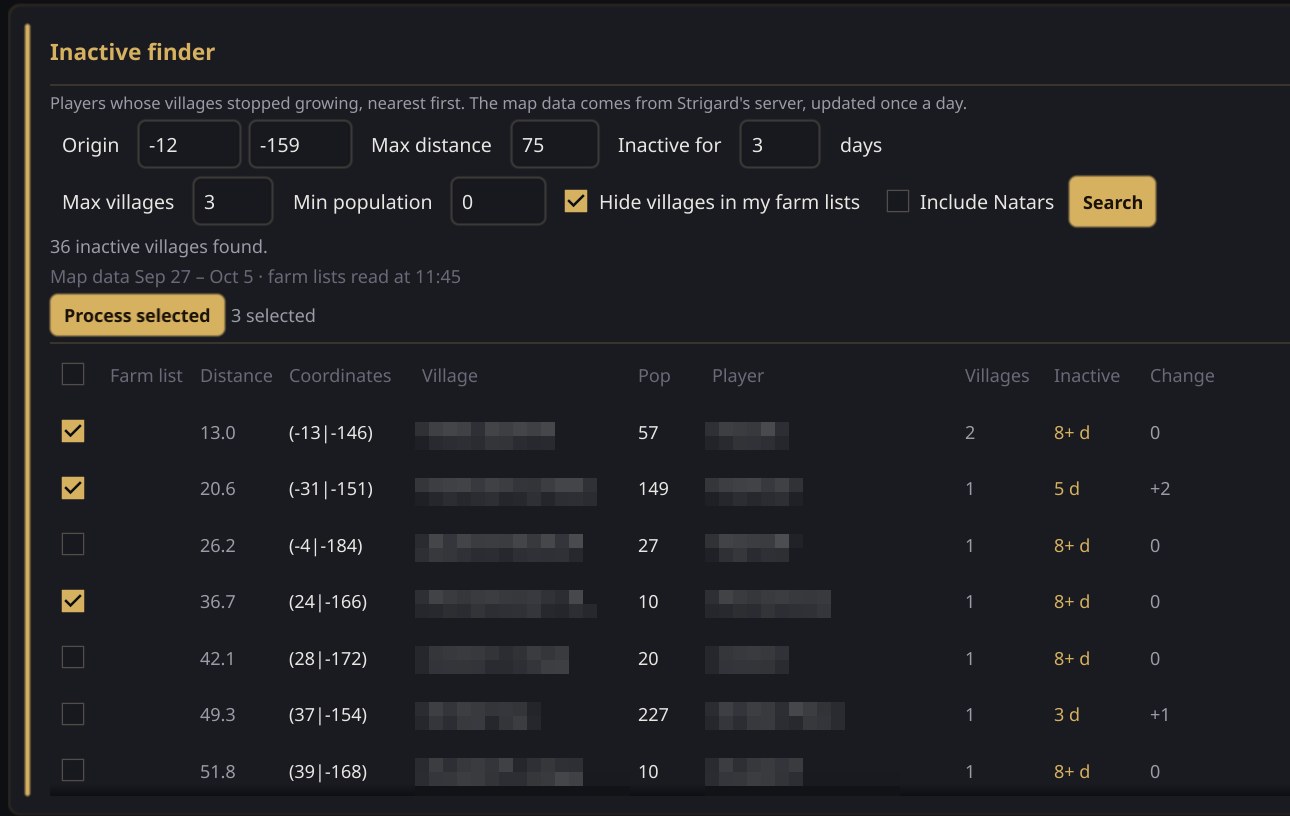
The filters
- Origin — the X and Y to search around. Results are sorted by distance from here.
- Max distance — how far to look, in fields, up to 100.
- Inactive for — how many days without growing. It goes by the player, not the village: if any of their villages grew, they do not show up.
- Max villages — the most villages a player can have. The default, 3, keeps to small accounts that gave up.
- Min population — leaves out villages smaller than this.
- Hide villages in my farm lists — on by default, so you only see villages you are not raiding yet.
- Include Natars — Natar villages belong to the game, not to a player. They are left out unless you tick this.
Reading the results
Nearest first, up to 200 villages. Above the list, a line says how many matched and which days the map data covers.
- Coordinates — click them to open the village on the Travian map.
- Pop and Villages — the village's population, and how many villages the player has.
- Inactive — days since the player last grew. 8+ d means at least that long: they have not grown since Strigard started reading that world's map.
- Change — how the population moved over the last few days. A negative number, in orange, means someone else is already raiding or catapulting that village.
Creating the farm list
This is the part that saves you the work. Instead of copying coordinates into the game one by one, you tick the villages and Strigard adds them for you.
- Tick the villages you want to raid, or the box in the header to tick them all.
- Press Process selected.
- In Create farm list, name the list, pick the village it belongs to — the one you searched from is already chosen — and enter the troops each target gets.
- Press Create.
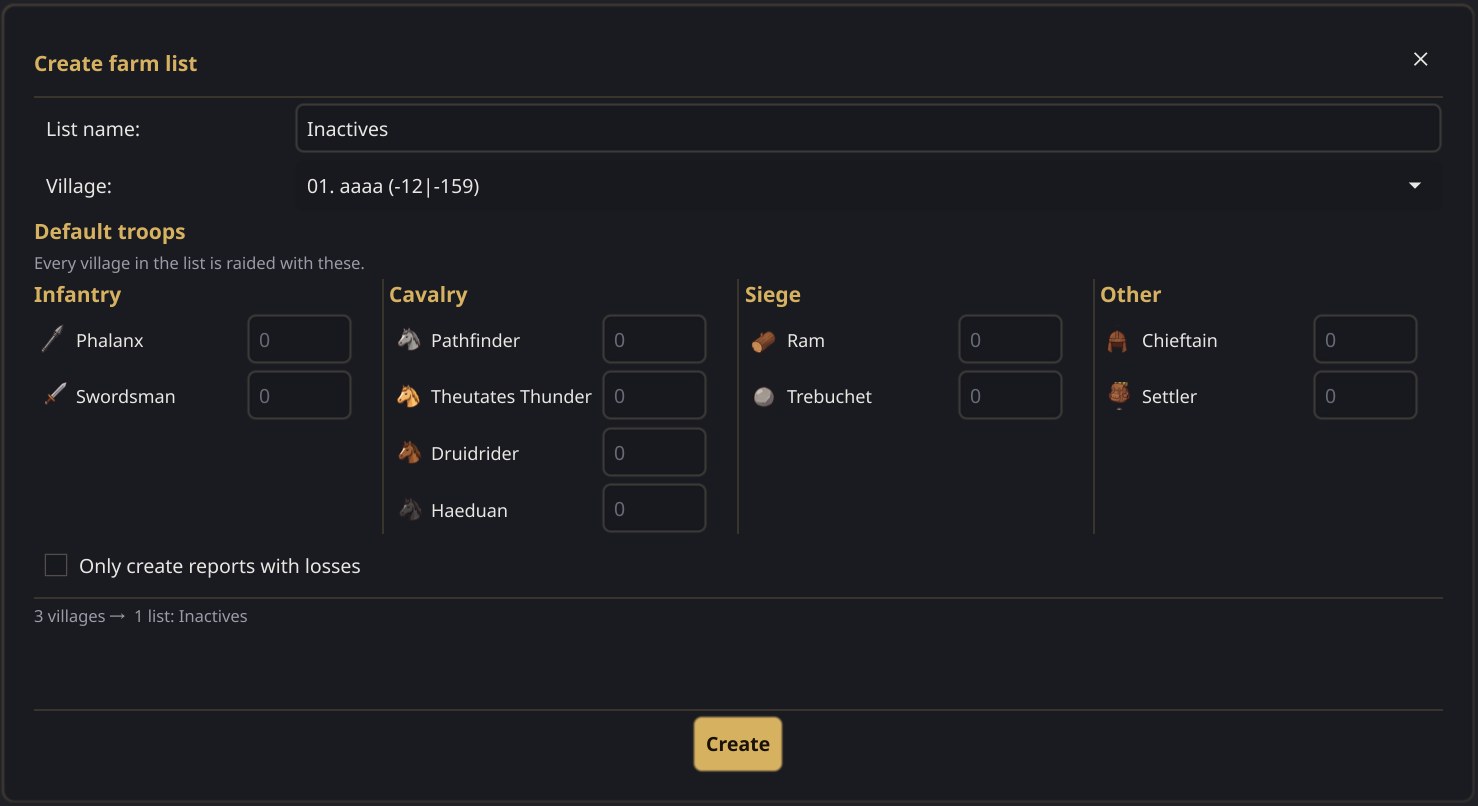
From there the bot does it in Travian: it creates the list and adds the villages one at a time, at the pace of a person — about five seconds each, so a hundred go in in around ten minutes. The progress shows under the filters (Adding to farm lists: 12/40), and each row says Queued, Added or Skipped.
More than 99 villages
A Travian farm list holds 99 targets. Tick more and Strigard makes as many lists as it needs: Inactives, Inactives 2 and so on. The dialog tells you how many before you press Create.
Then let Auto Farm send it
The new list shows up in Auto Farm like any other, unticked. Tick it and the raids go out on their own, at random intervals — see the Auto Farm guide. Turn on Auto-disable targets with losses as well: if a village you took for inactive fights back, it is switched off after the first bad raid.
Good to know
- Farm lists need Gold Club. Searching works without it, but the ticks stay greyed out: in Travian, farm lists are a Gold Club feature.
- The bot has to be running to add villages. With it off, the selection waits — even if you close Strigard — and carries on the next time you start the bot. Cancel drops what is left; what is already in the game stays there.
- A search does not touch your account. The map data comes from Strigard's server, so searching sends nothing to Travian. Only adding villages happens in the game, the way you would do it yourself.
- A new world needs a few days. The map is read once a day, so on a world that has just opened it is too early to tell who has stopped playing.
- Not growing is not always inactive. A player who only trains troops does not grow either. Start with a few troops per target and check the first reports.
- One search every 5 seconds, up to 60 a day, with an active Strigard license. The free trial counts.